The windows phones consist of numerous apps some of which are not required at all or there may be some apps that have some personal information and you don’t want anybody to see it. In this case you can either hide or lock all those apps. Hiding of apps on windows phone can be done in two ways. One method requires the use of app corner which is already there in the windows phone and the second method requires downloading of some apps. But to lock and Hide apps on windows phone using the first method needs the phone to be updated by the latest version of windows as only windows 8.1 version supports this app corner.
Method 1: Lock and Hide apps on Windows phone using app corner
This is a few steps process and no need to install any other apps.
- If your windows phone is updated by 8.1 versions then it is ready for the process otherwise visit here to update your phone.
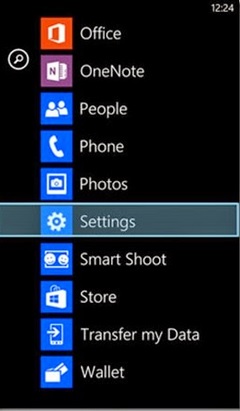
- Once your phone is updated swipe left on the start screen and press on settings from the option.
- Go to system settings from there.
- You will find the apps corner option in system settings.
- Press on that to find out the Apps option.
- Now click on that Apps and all the apps of your windows phone will be visible.
- Select all those apps that you want to hide and lock.
- Go down to get the check button and click on that.
- Now press the arrow button to come back to that apps corner page.
- Long press on the power button and swipe to the right to come out of apps corner. Now you will be asked for a password.
- Provide a password if you already have created it or else you have to create a new password by going to settings. To set password slide to right and then go to settings > system settings > apps corner > protect my phone with a password and create a new password.
- Now provide the password and exit from apps corner. The process is completed.
Method 2: This process requires some app lockers to be downloaded to lock and hide apps on windows phone. Matrix vault, Lock & Hide are such app lockers that you can use.
I was able to find good advice from your articles.