For smartphone users we are here with How To Transfer Entire Android Data To Your iPhone. Switching from android to iphone is not an easy task it requires lots of things to be done before doing this. You have to move all your data, contacts and many more saved notes etc from your android to iPhone which is not a simple task as iPhone doesn’t provide any inbuilt app to do the transfer between android and iPhone. So here we have a way that will help you to move your entire data from your android to the iPhone that your are going to switch to. So proceed with the complete discussion below.
How To Transfer Entire Android Data To Your iPhone
Here we have two different method to perform this task that will help you to move your all data from your android to iphone. So proceed with these methods below.
#1 Method: Transferring Photos And All Other Data
An app from apple is there on google play store that allows you to transfer your data from your android to iphone. This app creates a private wifi network which you can connect to iphone to move entire data. And the apps is given below:

With just a few steps, you can migrate your content automatically and securely from your Android device with the Move to iOS app. No need to save your stuff elsewhere before switching from Android. The Move to iOS app securely transfers all kinds of content for you:
Contacts
Message history
Camera photos and videos
Web bookmarks
Mail accounts
Calendars
#2 Transfer Contacts From Android To Iphone Using Google Account
- In your android Goto Settings -> Accounts and sync .
- Now there enter your gmail accounts details and click on enable synchronization.

- Now all your contacts will get backup on your gmail account.
- Now in your Iphone goto settings ->Mail, Contacts, Calendars .
- Click on add accounts and there add your google account that you used in your android.
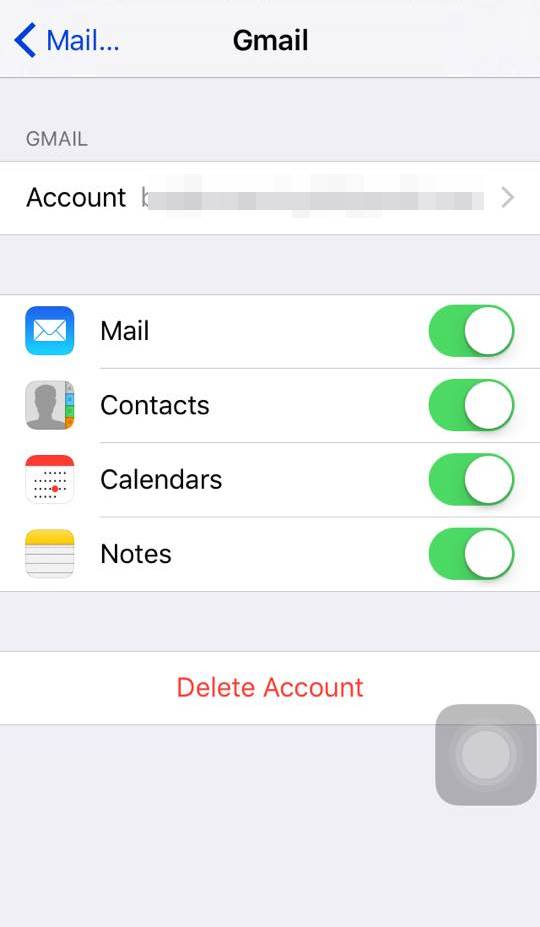
- Now swipe the contact button under it and click on Keep in my iPhone on the popup appears.
- Thats it all contacts and other data sync data from google account will get transfer to your iphone.
So above is all about How To Transfer Entire Android Data To Your iPhone. With the methods discussed above you can easily witch to your android to iphone with all your data that stored there in your android. Hope you like our work, keep on sharing with others too. Leave a comment of you have any related queries with this.